

RocSec
Microsoft Surface Go (1824) Battery - G16QA043H
Shipping calculated at checkout.
Condition: Brand New
Quality: OEM Original Replacement Part
Battery Compatible Model: Surface Go (1824)
How to identify Your Surface Model:
1: Find the Serial number and Model on the packaging
If you still have the original packaging for your Surface. you can find the serial number on the barcode label.

2: Find the serial number in Settings
Here's another quick way to find the serial number on your Surface (running on Windows 10):
Select Start > Settings > System > About.
On this page. find Windows Specifications. and look for your Serial number.
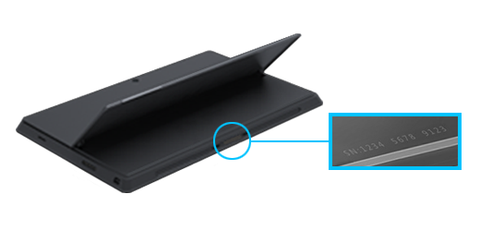
3: Find the Serial number and Model Number on your device
Look for your Surface model to locate its serial number.
If you have this Surface |
Find it here |
Surface Laptop |
Look under your keyboard near the hinge. |
Any Surface Pro model. Surface Go model. Surface 2. Surface 3. and Surface RT |
Flip out the kickstand and look for the string of numbers near its base. |


%20Battery%20-%20G16QA043H)